
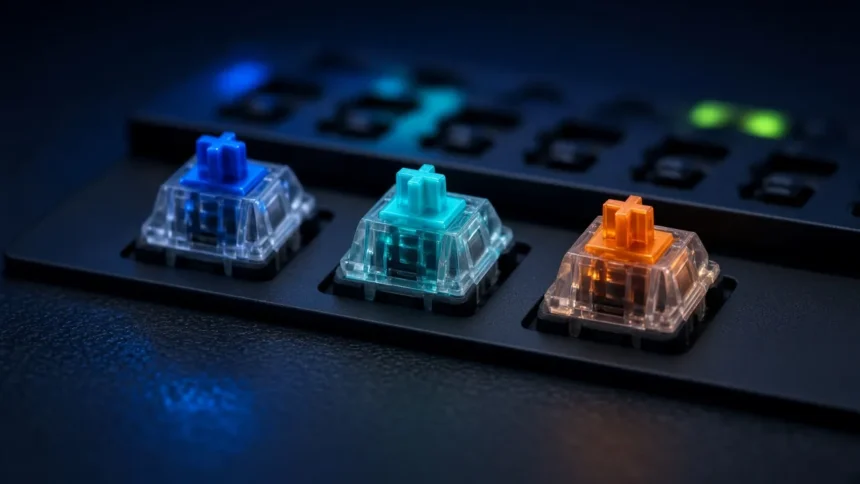
Mechanical keyboard switches explained in one line: linear switches move smoothly to the bottom, tactile switches add a small bump when the key registers, and clicky switches add a bump plus an audible click. None of them makes you a better gamer. Switch type is about how typing feels and sounds. The numbers that change speed are actuation point and reset, and that’s where 2026’s magnetic switches come in.
Key takeaway
- Linear (Red, Black, Speed Silver): smooth and quiet, the usual pick for gaming.
- Tactile (Brown): a bump you can feel at the actuation point, a good middle ground for typing and gaming.
- Clicky (Blue): bump plus click. Satisfying to type on, annoying for anyone sharing your room or hearing your mic.
- Actuation force and travel change comfort and fatigue far more than they change speed.
- Hall-effect (magnetic) switches let you set the actuation point and use Rapid Trigger, which is why competitive FPS players are moving to them.
Linear vs tactile vs clicky: the three switch types
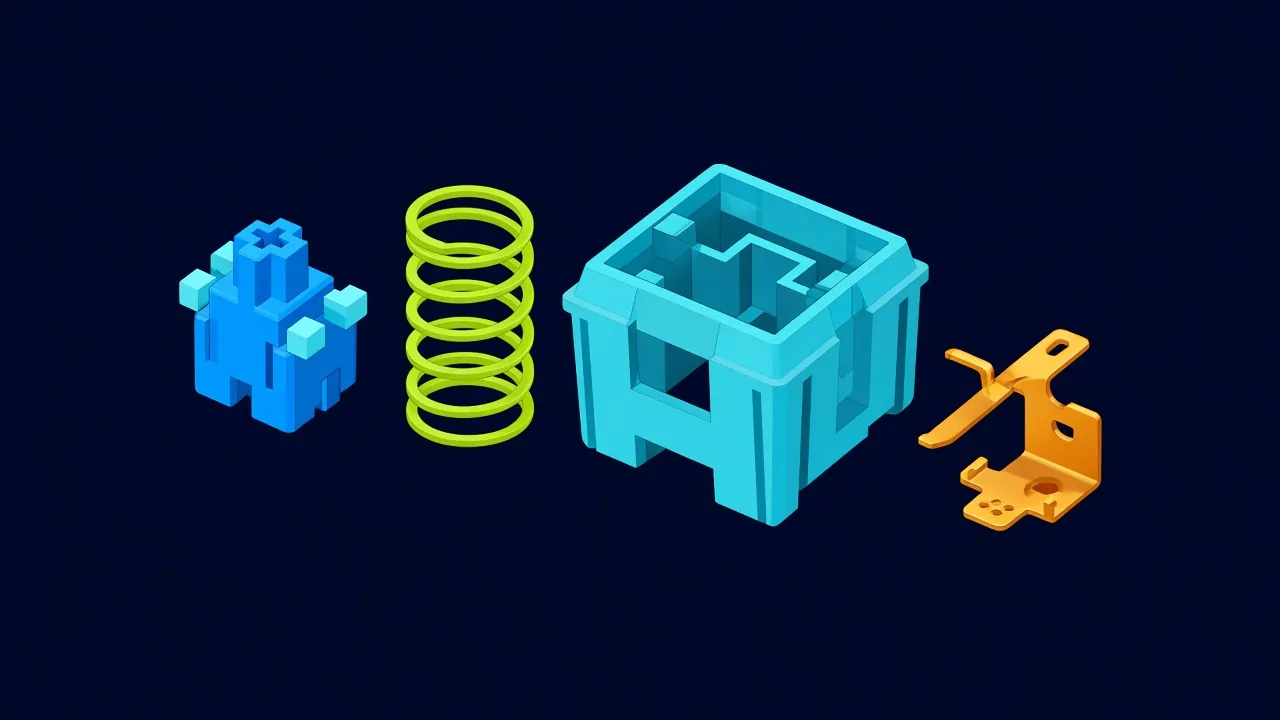
Inside a classic mechanical switch, a plastic stem sits on a spring. Press the key and the stem slides down, letting two metal contacts touch and close the circuit. The shape of the stem decides the feel. A straight stem gives a linear switch. A stem with a bump gives tactile feedback. Add a click jacket or click leaf and you get a clicky switch.
| Type | Feel | Sound | Best for | Skip it if |
|---|---|---|---|---|
| Linear | Smooth from top to bottom, no bump | Quiet (the loudest part is bottoming out) | FPS and fast games, shared rooms | You bottom out every key and want a cue to stop |
| Tactile | A bump at the actuation point | Quiet to moderate | Mixed typing and gaming, office work | You find the bump scratchy or slow for rapid taps |
| Clicky | Bump plus a sharp click | Loud | Solo typists who like feedback | You share a room, stream with an open mic or take calls |
What the colours mean
Stem colours started with Cherry MX and most brands copy the scheme loosely: Red and Black are linear, Brown is tactile, Blue is clicky. Treat colour as a hint, not a spec. A Gateron, Outemu or Kailh Brown can feel quite different from a Cherry Brown, so read the force and travel figures on the product page.
Cherry MX switch specs compared
Cherry publishes the clearest numbers, so it makes a good reference point. These figures come from Cherry’s current MX2A product pages.
| Switch | Type | Operating force | Pre-travel (actuation) | Total travel | Rated life |
|---|---|---|---|---|---|
| MX Red | Linear | 45 cN | 2.0 mm | 4.0 mm | 100 million+ keystrokes |
| MX Black | Linear | 60 cN | 2.0 mm | 4.0 mm | 100 million+ |
| MX Speed Silver | Linear | 45 cN | 1.2 mm | 3.4 mm | 100 million+ |
| MX Brown | Tactile | 55 cN | 2.0 mm | 4.0 mm | 100 million+ |
| MX Blue | Clicky | 60 cN | 2.2 mm | 4.0 mm | 50 million+ |
See the Cherry MX Red spec page for the full force curve. Most budget Indian keyboards use Outemu or similar clones with comparable ratings, often around 50 million presses.
What actuation force and travel change
Actuation force: comfort, not speed
Actuation force is how hard you press before the key registers. A 45 cN Red is light and easy to tap repeatedly. A 60 cN Black takes more effort, which some typists like because resting fingers don’t trigger keys by accident. Heavy switches tire fingers faster over long sessions; very light ones cause more typos if you have a heavy touch.
Pre-travel and total travel: how far the key moves
Pre-travel is the distance to the actuation point. Total travel is the distance to the bottom. Speed Silver registers at 1.2 mm against 2.0 mm on a Red, so the input arrives a fraction earlier. That gap is tiny next to your reaction time and your network latency. If games feel laggy, our guide to reducing ping and packet loss will do more than any switch swap.
Short pre-travel has a cost too: accidental presses. Brushing a key with a resting finger can register on a light, short switch.
💡 Expert tip: if you can, try a switch tester (a small board with one of each switch) before buying a full keyboard. Ten minutes of pressing Red, Brown and Blue side by side settles more than any spec sheet.
Switch feel is preference, not performance
Linear switches are popular with gamers because they’re smooth and quiet, and there’s no bump to push through on rapid taps. That doesn’t mean a Brown or Blue user is slower in any way you’d notice. Within the same actuation point, the switch type changes feel and sound, not the moment the key registers.
- Pick linear if you mostly play FPS or fast games, share a room, or want the quietest classic switch.
- Pick tactile if you type a lot and game sometimes, and want to feel each key register without the noise.
- Pick clicky if you type alone, love audible feedback and nobody nearby will complain. Avoid it for streaming or voice chat with an open mic.
Hot-swap vs soldered switches
On a soldered keyboard, the switches are fixed to the circuit board. Changing one means desoldering. A hot-swap board has sockets, so you pull a switch out with a tool and push a new one in. It’s the cheapest way to try another switch type, or to replace one dead key without replacing the whole keyboard.
| Hot-swap | Soldered | |
|---|---|---|
| Change switch type | Yes, in minutes with a puller | Needs desoldering |
| Fix one faulty key | Swap that switch | Repair or replace the board |
| Price | Now common even in budget boards | Cheapest boards |
| Watch out for | 3-pin vs 5-pin sockets; magnetic boards need magnetic switches | Locked into the switch you bought |
Socket type matters. 5-pin switches have two extra plastic legs for stability; they fit 3-pin sockets only if you clip those legs off. Hall-effect boards are a separate world: their sockets read a magnet, so ordinary mechanical switches won’t work in them, and the reverse is also true.
Why magnetic Hall-effect switches are the 2026 esports trend
A Hall-effect switch puts a magnet in the stem and a sensor on the circuit board. Instead of a simple on or off contact, the keyboard reads exactly how far down the key is. Two features follow from that.
- Adjustable actuation. You choose where each key registers. Wooting’s Lekker switches travel 4.0 mm and can actuate anywhere from 0.1 to 4.0 mm, set per key in software.
- Rapid Trigger. A normal switch resets at a fixed point on the way up. Rapid Trigger resets the key as soon as you start lifting it and re-actuates as soon as you press again. In shooters, that means faster stops and direction changes when you tap movement keys.
Wooting’s Rapid Trigger setup guide explains the details, including per-key settings so only your movement keys use it. There are no contacts to wear out, which is another plus. The trade-offs: prices are higher, almost all magnetic switches are linear, and the features depend on the maker’s software.
⚠️ Watch out for: Rapid Trigger and input automation are different things. Valve announced in August 2024 that Counter-Strike 2 players using modes like Snap Tap or SOCD, which automate opposing movement keys, can be kicked from official matches, as The Verge reported. Turn those modes off before you queue.
| Switch tech | How it registers | Adjustable actuation | Rapid Trigger | Best for |
|---|---|---|---|---|
| Mechanical (Cherry, Gateron, Outemu) | Metal contacts touch | No | No | Most buyers, typing, budget gaming |
| Optical | Stem breaks a light beam | Only on analog optical boards | Some models | Gamers wanting no contact wear |
| Hall-effect (magnetic) | Magnet and sensor read key depth | Yes, often 0.1 to 4.0 mm | Yes | Competitive FPS players |
Common mistakes when choosing switches
- Buying Blue switches for a shared hostel room or a streaming setup.
- Paying extra for “speed” switches expecting better aim. Practice and a stable connection matter more.
- Assuming every Red feels like a Cherry Red. Clones vary in force, smoothness and wobble.
- Buying a soldered board when you aren’t sure which switch you like. Hot-swap is cheap insurance.
- Ignoring keyboard size. A compact layout gives your mouse more room, which helps more in FPS games than the switch does.
What to buy
On a tight budget, a hot-swap board with Outemu Red switches is the sensible starting point. Our picks for the best gaming keyboard under ₹2000 include swappable mechanical options. If you play competitive shooters and can spend more, our guide to mechanical keyboards for competitive gaming covers Hall-effect and Rapid Trigger boards from Wooting, SteelSeries, Logitech and Razer.
Mostly typing and office work? A tactile or quiet board, or one of our wireless keyboard and mouse combos, will serve you better than a loud gaming board. And if you play FPS seriously, pair the keyboard with a 240Hz esports monitor before chasing smaller switch gains.
How we researched this
This guide is research-based. We compared Cherry’s published MX2A switch specifications, Wooting’s documentation on Lekker switches and Rapid Trigger, and Valve’s August 2024 Counter-Strike 2 announcement on input automation. We did not run our own latency tests. Last checked: November 2026.
Frequently asked questions
What are mechanical keyboard switches?
Mechanical keyboard switches are individual key mechanisms with a stem, a spring and metal contacts under every key. Pressing the key pushes the stem down until the contacts close and the keystroke registers. The stem shape decides whether a switch feels linear, tactile or clicky, which is why switch type changes the typing feel.
Which is better for gaming: linear, tactile or clicky?
Linear switches are the usual gaming choice because they’re smooth, quiet and have no bump to push through on rapid taps. Tactile and clicky switches aren’t meaningfully slower at the same actuation point, so pick the feel you like. For competitive FPS, a Hall-effect board with Rapid Trigger matters more than switch type.
Are red, brown or blue switches best for typing?
Brown tactile switches suit most typists because you feel each key register without loud noise. Blue clicky switches give the strongest feedback but are loud in shared spaces. Red linear switches work well for light typists. If you can, try a switch tester before buying a full keyboard.
What does actuation force mean on a keyboard switch?
Actuation force is how hard you must press before a key registers, usually listed in grams or centinewtons. Cherry MX Red needs 45 cN and MX Black 60 cN. Lighter switches are easier on the fingers during long sessions, while heavier ones reduce accidental presses for people with a heavy touch.
Do faster switches like Speed Silver improve gaming?
Speed Silver registers at 1.2 mm instead of 2.0 mm, so input arrives slightly sooner. The gain is small compared with reaction time, monitor refresh and network latency. The shorter actuation also causes more accidental presses. Pick it if you like a light, shallow feel, not as a skill upgrade.
What is a hot-swappable keyboard?
A hot-swappable keyboard has sockets instead of soldered switches, so you can pull switches out with a tool and press new ones in without soldering. It lets you try another switch type or replace one faulty key cheaply. Check whether the sockets are 3-pin or 5-pin before buying replacement switches.
Are Hall-effect magnetic switches worth it?
Hall-effect switches are worth it for competitive FPS players who will use adjustable actuation and Rapid Trigger. They also avoid contact wear. For typing, casual gaming or a tight budget, a good mechanical board is enough. Magnetic boards cost more, are mostly linear, and depend on the maker’s software.
Is Rapid Trigger allowed in esports?
Rapid Trigger is widely used, because each press and release is still your own input. Valve’s Counter-Strike 2 rule targets input automation instead: modes like Snap Tap or SOCD that resolve opposing keys for you can get you kicked from official matches. Rules differ by game and tournament, so check before you compete.
Can I put any switch in any hot-swap keyboard?
No. Most mechanical hot-swap boards accept MX-style switches, but 5-pin switches need their extra plastic legs clipped to fit 3-pin sockets. Low-profile switches need low-profile boards. Hall-effect boards only work with compatible magnetic switches, so ordinary mechanical switches won’t register in them.
Our verdict
With mechanical keyboard switches explained, the choice gets simple: pick the feel you enjoy and the sound your room can live with. Linear for quiet gaming, tactile for typing plus gaming, clicky only if nobody nearby minds.
Buy hot-swap if you’re unsure, so a wrong guess costs a switch set, not a keyboard. Pay for a Hall-effect board only if you play competitive shooters and will set up Rapid Trigger.